The Indie Hacker's Guide to Authentication: From Side Project to Scale
You don't need enterprise auth for your side project. This guide shows you exactly what to build at each stage—from MVP to 100K users—without over-engineering or breaking the bank.

You've got a great idea. You've spent weeks building the core feature that makes your product unique. Now you need login. Just simple login. Email, password, maybe Google sign-in. Should take a few hours, right?
Except every auth provider you look at wants to sell you enterprise SSO, SCIM provisioning, advanced MFA, and features you've never heard of. Auth0's pricing calculator gives you sticker shock. Clerk looks great but you're bootstrapping on $0 revenue. The documentation all assumes you're building the next Stripe with a team of 20 engineers.
You just want login. You want it to work. You want to ship this weekend.
This guide is for you.
Whether you're a solo founder building your first SaaS, an indie hacker with a side project going live, or a bootstrapped team watching every dollar, this guide will show you exactly what you need at each stage—from MVP to scale—without over-engineering, without overspending, and without vendor lock-in that'll haunt you later.
The Indie Auth Dilemma
Here's the problem indie hackers face: authentication is simultaneously critical and a complete distraction from building your actual product.
Authentication is critical because:
- It's the first thing users interact with
- If it breaks, users can't access your product (revenue = $0)
- Security matters, even for side projects
- You can't easily change it later without migrating users
Authentication is a distraction because:
- You're building a project management tool, not an auth system
- Every hour on auth is an hour not spent on your core features
- Your first 100 users won't care about enterprise SSO
- You don't even know if this idea will work yet
The enterprise auth providers don't help. They've optimized for selling to CTOs with $50K budgets, not solo founders shipping MVPs. Their documentation assumes you have a backend team. Their pricing assumes you have revenue. Their feature lists assume you need everything.
You need a different approach.
Authentication Decision Tree: Choose Your Path
Use this decision tree to quickly determine the best authentication approach for your indie project:
START: What are you building?

├─ B2C app (consumers, individuals)
│  ├─ Pre-revenue, validating idea
│  │  ├─ Time budget: 2-4 hours
│  │  │  └─ → Firebase (fastest start)
│  │  └─ Want control + flexibility
│  │     └─ → NextAuth.js (if using Next.js)
│  │
│  └─ Post-PMF, have revenue
│     ├─ Staying B2C forever
│     │  └─ → Firebase or AuthHero
│     └─ Might pivot to B2B
│        └─ → AuthHero (SSO ready)
│
└─ B2B SaaS (selling to companies)
   ├─ Early stage (0-100 customers)
   │  ├─ No SSO requests yet
   │  │  └─ → Firebase or AuthHero
   │  └─ First SSO request received
   │     └─ → AuthHero or WorkOS
   │
   └─ Growth stage (100+ customers)
      ├─ Venture-funded
      │  └─ → WorkOS or Clerk
      └─ Bootstrapped
         └─ → AuthHero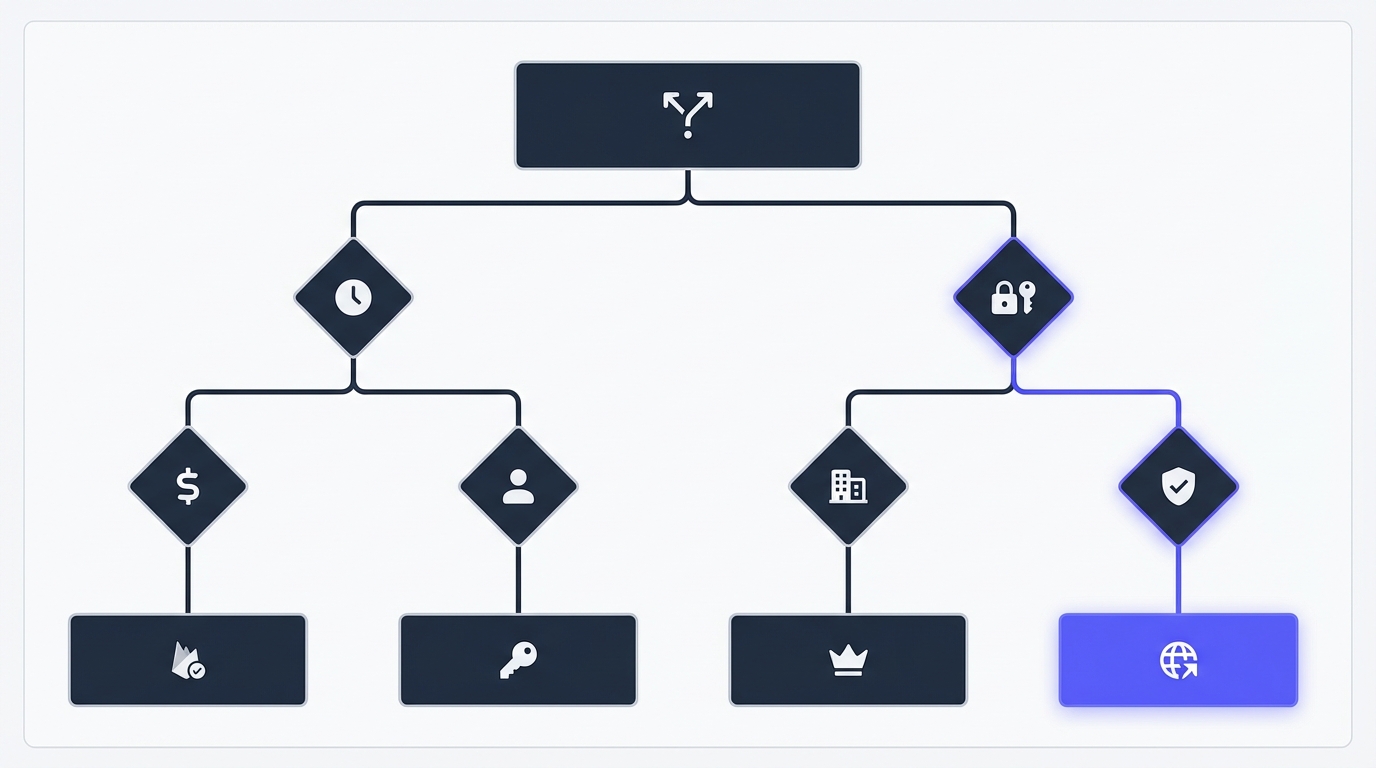
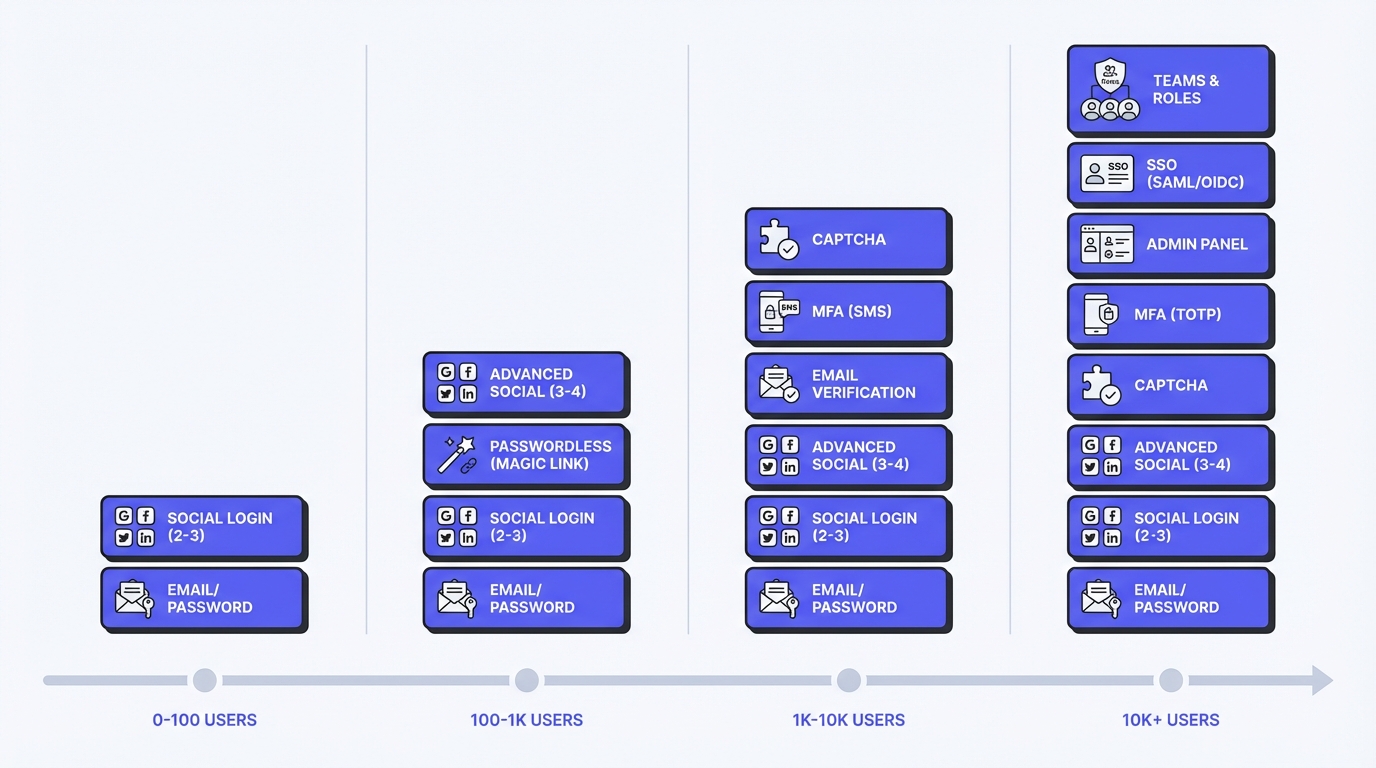
Phase-by-Phase Feature Matrix
This table shows exactly what authentication features you need at each growth stage:
| Feature | Phase 1<br>MVP<br>(0-100 users) | Phase 2<br>Traction<br>(100-1K users) | Phase 3<br>Product<br>(1K-10K users) | Phase 4<br>Scale<br>(10K+ users) |
|---|---|---|---|---|
| Email/password | ✅ Required | ✅ Required | ✅ Required | ✅ Required |
| Password reset | ✅ Required | ✅ Required | ✅ Required | ✅ Required |
| Session management | ✅ Required | ✅ Required | ✅ Required | ✅ Required |
| Social login (Google) | ⏭️ Skip | ✅ If users ask | ✅ If users ask | ✅ Recommended |
| Email verification | ⏭️ Skip | ⚠️ If spam problem | ✅ Recommended | ✅ Required |
| 2FA/MFA (app-based) | ⏭️ Skip | ⏭️ Skip | ⚠️ If users ask | ✅ Recommended |
| SMS MFA | ⏭️ Skip | ⏭️ Skip | ⚠️ If compliance needs | ⚠️ Only if required |
| Team/org support | ⏭️ Skip | ⏭️ Skip | ✅ If 10%+ ask | ✅ Required (B2B) |
| Role-based access | ⏭️ Skip | ⏭️ Skip | ✅ If teams needed | ✅ Required (B2B) |
| SAML SSO | ⏭️ Skip | ⏭️ Skip | ⚠️ If deal blocker | ✅ Required (B2B) |
| SCIM provisioning | ⏭️ Skip | ⏭️ Skip | ⏭️ Skip | ⚠️ Enterprise only |
| Audit logs | ⏭️ Skip | ⏭️ Skip | ✅ Basic logging | ✅ Full audit trail |
| Custom domain | ⏭️ Skip | ⏭️ Skip | ⚠️ If brand-critical | ✅ Recommended |
Legend:
- ✅ Required - Build this now
- ⚠️ Conditional - Build if specific need arises
- ⏭️ Skip - Don't build yet, focus on core product
Phase 1: MVP Authentication (0-100 users)
Your situation:
- You're pre-launch or just launched
- Zero to low revenue
- Building nights and weekends
- Need to validate the idea fast
Time budget: 2-4 hours maximum
At this stage, authentication should be invisible infrastructure. You need the minimum viable login flow that lets users create accounts and come back tomorrow. That's it.
What You Actually Need
Must have:
- Email/password signup and login
- Password reset (users will forget)
- Session management (stay logged in)
- Basic security (hashed passwords, HTTPS)
Nice to have (skip for now):
- Social login (Google, GitHub)
- Email verification (add it if spam becomes a problem)
- Two-factor authentication (your first 100 users won't ask for it)
Definitely skip:
- SAML SSO (your users are individuals, not enterprises)
- SCIM provisioning (see above)
- Advanced MFA (WebAuthn, hardware keys)
- Custom branding (default login page is fine)
- Audit logs (you can add logging later when it matters)
💡 Key Insight: Your first 100 users care about whether your product solves their problem, not whether your login page has your logo. Ship the MVP. Get users. Learn if they care about your product.
Recommended Approach: Three Options
You have three viable authentication options at this stage. Choose based on your technical comfort and growth plans.
Option 1: Firebase/Supabase (Best for most indies)
Firebase Authentication gives you production-ready auth in under an hour. Supabase is similar but open-source-friendly.
// Seriously, this is it for signup
import { getAuth, createUserWithEmailAndPassword } from "firebase/auth";

const auth = getAuth();
createUserWithEmailAndPassword(auth, email, password)
  .then((userCredential) => {
    // User is signed up and logged in
    const user = userCredential.user;
  })
  .catch((error) => {
    // Handle errors (email already in use, weak password, etc.)
  });
Pros:
- Free for your first 10K-50K users (plenty for validation)
- SDKs for every framework (React, Vue, Next.js, Svelte, etc.)
- Handles sessions, password reset, email verification automatically
- Can add Google/GitHub login with 2 lines of code
- Google-scale reliability (99.95% uptime SLA)
Cons:
- Limited if you pivot to B2B (no SAML SSO)
- Owned by Google (they've killed products before)
- Harder to export users if you outgrow it
Best for: B2C SaaS, consumer apps, anything pre-product-market-fit
Option 2: AuthHero (Best for indie hackers planning to grow)
Built specifically for founders who start solo but might grow into B2B.
// Simple integration, but with a growth path
import { AuthHeroAuth } from '@productname/sdk';

const auth = new AuthHeroAuth({ apiKey: process.env.PRODUCTNAME_KEY });

// Same simple API, but SSO/teams are there when you need them
await auth.signUp({ email, password });
Pros:
- 10,000 MAU free (enough for validation phase)
- Simple API for MVP, but includes SSO/teams when you need them later
- Export users anytime (no lock-in)
- Transparent pricing (you know what scale will cost)
- Built for indie devs (docs assume solo founder, not enterprise team)
Cons:
- Smaller community than Firebase
- Newer product (less battle-tested)
Best for: Indie hackers who might pivot to B2B, founders planning to scale, anyone who values transparent pricing
Option 3: NextAuth.js / Auth.js (Best if you're on Next.js and want control)
If you're on Next.js and comfortable with code, NextAuth gives you flexibility and full control.
// pages/api/auth/[...nextauth].js
import NextAuth from "next-auth"
import GoogleProvider from "next-auth/providers/google"
import EmailProvider from "next-auth/providers/email"

export default NextAuth({
  providers: [
    GoogleProvider({
      clientId: process.env.GOOGLE_ID,
      clientSecret: process.env.GOOGLE_SECRET,
    }),
    EmailProvider({
      server: process.env.EMAIL_SERVER,
      from: process.env.EMAIL_FROM,
    }),
  ],
  database: process.env.DATABASE_URL,
})
Pros:
- Free (just runs on your infrastructure)
- Extremely flexible and customizable
- Active community and extensive documentation
- Works with any database (Postgres, MySQL, MongoDB)
Cons:
- You manage the infrastructure (costs your time)
- You're responsible for security updates
- Email sending costs (if using magic links)
- More code to maintain
Best for: Next.js projects, developers who want full control, teams with backend experience
Quick Comparison: Which Should You Choose?
| Criteria | Firebase | AuthHero | NextAuth.js |
|---|---|---|---|
| Setup time | 1 hour | 1-2 hours | 2-4 hours |
| Monthly cost (10K users) | $0-50 | $0-109 | $0-30 (infra) |
| Best for | Pure B2C | B2C → B2B path | Next.js + control |
| SSO support | ❌ No | ✅ Yes (Pro tier) | ⚠️ DIY (60+ hrs) |
| Export users | ⚠️ Limited | ✅ Full export | ✅ Full control |
| Lock-in risk | ⚠️ High | ✅ Low | ✅ None |
MVP Auth Implementation Checklist
Whatever option you choose, here's your 2-hour implementation plan:
Hour 1: Basic signup/login
- [ ] Add signup form (email + password)
- [ ] Add login form (email + password)
- [ ] Test creating account and logging in
- [ ] Verify session persists (stays logged in after refresh)
Hour 2: Password reset + deployment
- [ ] Add "Forgot password" link to login page
- [ ] Implement password reset flow (usually built into your auth provider)
- [ ] Test full flow from reset request to new password
- [ ] Deploy to production
- [ ] Test on live site
That's it. Don't add social login yet. Don't add email verification yet. Don't customize the login page. Ship the MVP. Get users. Learn if they care about your product. You can add auth polish later when it matters.
Phase 2: Early Traction (100-1,000 users)
Your situation:
- Users are signing up organically
- Maybe early revenue ($100-500 MRR)
- Auth is working but users are asking for improvements
- You're still mostly solo or tiny team
Time budget: 4-8 hours for improvements
This is when you start listening to user feedback about authentication. Not what you think they need—what they're actually asking for.
What to Add Based on User Demand
If users say "I wish I could sign in with Google":
Add Google OAuth. It takes 30 minutes and meaningfully improves conversion for some user segments.
// Firebase example - literally 2 lines
import { GoogleAuthProvider, signInWithPopup } from "firebase/auth";

const provider = new GoogleAuthProvider();
signInWithPopup(auth, provider);
Users who prefer social login convert better (fewer form fields, no password to remember, faster signup). But don't add 5 different social providers. Start with Google (most common). Add GitHub if you're building for developers. That's enough.
If users say "I forgot my password again":
You already have password reset (you built it in Phase 1, right?). But you might want to add:
- Email verification (reduces password reset spam)
- Magic links (passwordless email login)
- "Remember this device" checkbox (reduce login friction)
If users aren't saying anything about auth:
Then don't spend time on it! Work on your core product. Auth that "just works" is perfect auth.
Session Management Basics
At 100-1,000 users, you'll start seeing session edge cases. Here's how to handle them.
"Why did I get logged out?"
- Most auth systems default to 30-day sessions
- Extend to 90 days or add "remember me" option if your app is used infrequently
- Add "Keep me signed in" checkbox (stores refresh token)
"Can I be logged in on multiple devices?"
- Yes, by default
- Users expect to be logged in on phone + laptop + work computer
- Only add single-session enforcement if you have a security reason (rare)
"I cleared cookies and now I'm locked out"
- This is actually a password reset problem, not a session problem
- Make sure password reset is easy to find (prominent link on login page)
- Consider magic links as backup (email a login link, no password needed)
When to Add MFA (Hint: User Feedback Tells You)
Don't add two-factor authentication because it's "best practice." Add it when users ask for it, or when you're storing sensitive data.
Add MFA if:
- Users explicitly request it (security-conscious segment)
- You're storing financial data, health data, or PII
- Compliance requires it (HIPAA, SOC 2, etc.)
- You're B2B and prospects ask about security during sales calls
Start with app-based TOTP:
- Google Authenticator, Authy, 1Password, etc.
- Free for you, free for users
- Standard (works with every auth app)
- More secure than SMS (no SIM swapping attacks)
Skip SMS MFA unless you have to:
- Costs $0.02-0.06 per message
- 1,000 users logging in 2x/month = $40-120/month
- Less secure than app-based TOTP (SIM swapping attacks)
- Required for some compliance frameworks, but not most
Definitely skip (for now):
- WebAuthn/Passkeys (great tech, low adoption, wait for critical mass)
- Hardware tokens (enterprise-only use case)
- Biometric MFA (nice-to-have, not need-to-have)
Phase 2 Reality Check
At this stage, you should be spending maybe 5% of your development time on auth. The other 95% should be on features that differentiate your product.
If you're spending more time than that, you're over-engineering. Ship core features. Get to revenue. Auth polish can wait.
Phase 3: Real Product (1,000-10,000 users)
Your situation:
- Consistent revenue ($2K-20K MRR)
- Small team (2-5 people) or still solo
- Users include some small businesses
- Auth is mission-critical (downtime = lost revenue)
Time budget: 1-2 days for team/org features
This is the phase where you evolve from "consumer app with login" to "real product with user management." Some of your users are no longer individuals—they're small teams.
Organization/Team Support: The Data Model Shift
The first time a customer emails "Can I add my coworker to my account?" you need team support. This is a bigger change than it sounds.
Basic team model:
- Organizations (or "Workspaces" or "Teams"—pick your naming)
- Members belong to an organization
- One user can belong to multiple organizations (important!)
- Invitation system (email-based is fine)
Implementation reality check:
This isn't just adding auth features—you're restructuring your data model.
// BEFORE: user owns resources directly
user -> has many projects

// AFTER: organization owns resources, users belong to organizations
user -> belongs to many organizations
organization -> has many projects
organization -> has many members (users)
Time estimate: 8-16 hours to implement organizations properly (data model migration, invitation flow, switching between orgs, permissions).
When to do this: When at least 10% of your customers are asking for it, or when you're actively targeting B2B.
When to wait: If you're pure B2C (individual users only), you might never need this.
Role-Based Access Control (Keep It Simple!)
Once you have teams, you need roles. But indie hackers make a classic mistake: over-engineering permissions.
Don't build this (50 hours of work):
- Granular permissions (create_project, read_project, update_project, delete_project...)
- Permission groups (manager, editor, contributor, viewer...)
- Custom roles (define your own permission sets...)
- Resource-level permissions (User A can edit Project 1 but not Project 2...)
Build this instead (4 hours of work):
- Owner - Full control, can delete organization, manage billing
- Admin - Can manage members and settings
- Member - Standard access to organization resources
That's it. Three roles cover 95% of use cases. You can add "read-only" viewer role later if customers ask. You can add custom roles at Phase 4 if enterprise customers need it.
Simple RBAC Implementation
const ROLES = {
  OWNER: 'owner',     // Full control
  ADMIN: 'admin',     // Manage members
  MEMBER: 'member'    // Standard access
};

function canManageMembers(userRole) {
  return [ROLES.OWNER, ROLES.ADMIN].includes(userRole);
}

function canDeleteOrganization(userRole) {
  return userRole === ROLES.OWNER;
}
Audit Logs (Basic Is Fine)
Some customers will ask "Can I see who accessed what?" This is table stakes for B2B.
Basic audit logging:
- Who logged in (user, timestamp, IP)
- Who invited/removed members (user, action, timestamp)
- Who changed org settings (user, setting, old value, new value)
Implementation:
// Just insert to an audit_logs table
await db.auditLogs.insert({
  organizationId: org.id,
  userId: user.id,
  action: 'member.invited',
  metadata: { invitedEmail: 'newuser@example.com' },
  timestamp: new Date(),
  ipAddress: req.ip
});
Don't build (yet):
- Audit log UI (store the data, show it later when customers ask)
- Advanced filtering (basic search is enough)
- Export to SIEM tools (enterprise feature for Phase 4)
Your First Enterprise Customer Asks for SSO—Now What?
This is the moment of truth for many indie products. A customer willing to pay $500/month (or more) asks: "Do you support SAML SSO?"
What is SAML SSO: Single Sign-On lets their employees log into your app using their company identity provider (Okta, Google Workspace, Azure AD). They don't create individual passwords—they use their work login.
Why they want it:
- IT control (onboard/offboard employees centrally)
- Better security (company enforces MFA, password policies)
- Compliance requirements (some industries mandate SSO)
Your options:
| Option | Time Investment | Cost | Recommendation |
|---|---|---|---|
| Build SAML yourself | 40-80 hours (skilled)<br>2-3 weeks (learning) | $6K-12K in time | ⚠️ Only if you can't afford a provider |
| Switch to provider with SSO | 8-20 hours (migration) | $29-249/month | ✅ Best ROI for most indies |
| Stay consumer-focused | 0 hours | $0 | ✅ Valid if B2B isn't your market |
Our recommendation: If a customer is willing to pay $500+/month and SSO is the only blocker, find a way to say yes. Either switch to an auth provider that includes it (like AuthHero at $29/month), or build it. The revenue justifies the effort.
Phase 4: Scaling Up (10,000+ users)
Your situation:
- Solid revenue ($50K+ MRR)
- Real team (5-15 people)
- Mix of B2C and B2B customers
- Auth is complex (SSO, teams, MFA, integrations)
Time budget: Re-evaluate your entire auth stack
At this scale, your Phase 1 decisions come back to haunt you—or prove prescient. This is when technical debt from early shortcuts becomes painful.
When Enterprise Features Actually Matter
Here's what enterprise customers will ask for at this scale:
SAML SSO (critical for B2B):
- If you don't have it yet, you need it now
- Expect 20-40% of enterprise prospects to require it
- Won't close deals without it (even if product is perfect)
SCIM Provisioning:
- Auto-create user accounts when IT adds employee to the app
- Auto-disable accounts when employee leaves company
- Sync user attributes (name, email, department, role)
Time to implement: 60-120 hours if building yourself. Most indie hackers at this stage switch to an auth provider that includes it rather than build.
Advanced MFA:
- WebAuthn/Passkeys (industry moving this direction in 2025)
- Adaptive MFA (require MFA based on risk signals: new device, new location)
- MFA enforcement policies (require all users in org to enable MFA)
Custom domains:
auth.yourdomain.cominstead ofyourdomain.authprovider.com- Matters for brand consistency and user trust
- Some enterprises require it for security policies (can't authenticate through third-party domains)
At this scale, these features unlock revenue. A feature that costs $2K to implement but closes a $50K annual contract is a no-brainer investment.
Build vs. Buy Calculator at Scale
Use this framework to decide whether to build your own auth or stick with a provider:
| Factor | Build Your Own | Use Provider |
|---|---|---|
| Monthly auth cost | High ($2K+/month) | Low (<$1K/month) |
| Engineering capacity | Have dedicated engineers | Team is stretched thin |
| Compliance needs | On-premise required | Cloud-hosted OK |
| Customization needs | Extremely custom flows | Standard flows work |
| Engineering preference | Want to own stack | Focus on core product |
| Scale | 100K+ users | <100K users |
Consider building (or switching to open-source self-hosted) if:
- You're paying $2K+/month for auth and your engineers could maintain an open-source solution for less
- You need extremely custom flows that no provider supports
- You have compliance needs that require on-premise hosting (rare)
- You have engineers who want to own the auth stack (and maintain it forever)
Stick with a provider if:
- Your auth costs are under $1K/month (engineering time costs more)
- Security/compliance is high stakes (healthcare, finance) and you want the provider's audit reports
- Your team is shipping fast and auth maintenance would slow you down
- You value "not our problem" when auth bugs happen at 2am
Real talk: Most indie products that reach this scale stay with auth providers. The ROI on building rarely pencils out unless you're massive (100K+ users) or have unique requirements.
Migration Strategies Without Downtime
If you do switch auth providers (Firebase → AuthHero, Auth0 → WorkOS, etc.), you can't just flip a switch. You have 10,000+ users with active sessions who expect their login to keep working.
Gradual migration approach:
Phase 1: Dual-write (Week 1)
- Deploy new auth provider alongside old one
- All new signups use new provider
- Existing users still use old provider
- Both systems running in parallel
Phase 2: Background migration (Weeks 2-4)
- Export users from old provider
- Import to new provider (hashed passwords if possible, reset flow if not)
- Test that migrated users can log in
- Don't force logout yet
Phase 3: Soft cutover (Week 5)
- On next login, detect if user is on old system
- Migrate their session to new system transparently
- Gradually all active users migrate naturally
Phase 4: Force cutover (Week 6+)
- Email inactive users "Security update: please log in again"
- Disable old auth system
- All users now on new system
Critical: Have rollback plan at every phase. Don't delete old system until 100% migrated and stable for 2+ weeks.
Build vs. Buy: Time and Cost Analysis
This comparison shows the true cost of building vs. buying authentication at different scales:
Time Investment Comparison
| Approach | Initial Setup | Ongoing Maintenance | Total Year 1 |
|---|---|---|---|
| Build from scratch | 40-120 hours | 10-20 hours/month | 160-360 hours |
| Firebase/Supabase | 1-2 hours | 0-2 hours/month | 1-26 hours |
| AuthHero | 1-3 hours | 0-2 hours/month | 1-27 hours |
| NextAuth.js | 4-8 hours | 2-5 hours/month | 28-68 hours |
At $150/hour engineer cost:
- Build from scratch: $24,000-54,000 in Year 1
- Firebase: $150-3,900 in Year 1
- AuthHero: $150-4,050 in Year 1
- NextAuth: $4,200-10,200 in Year 1
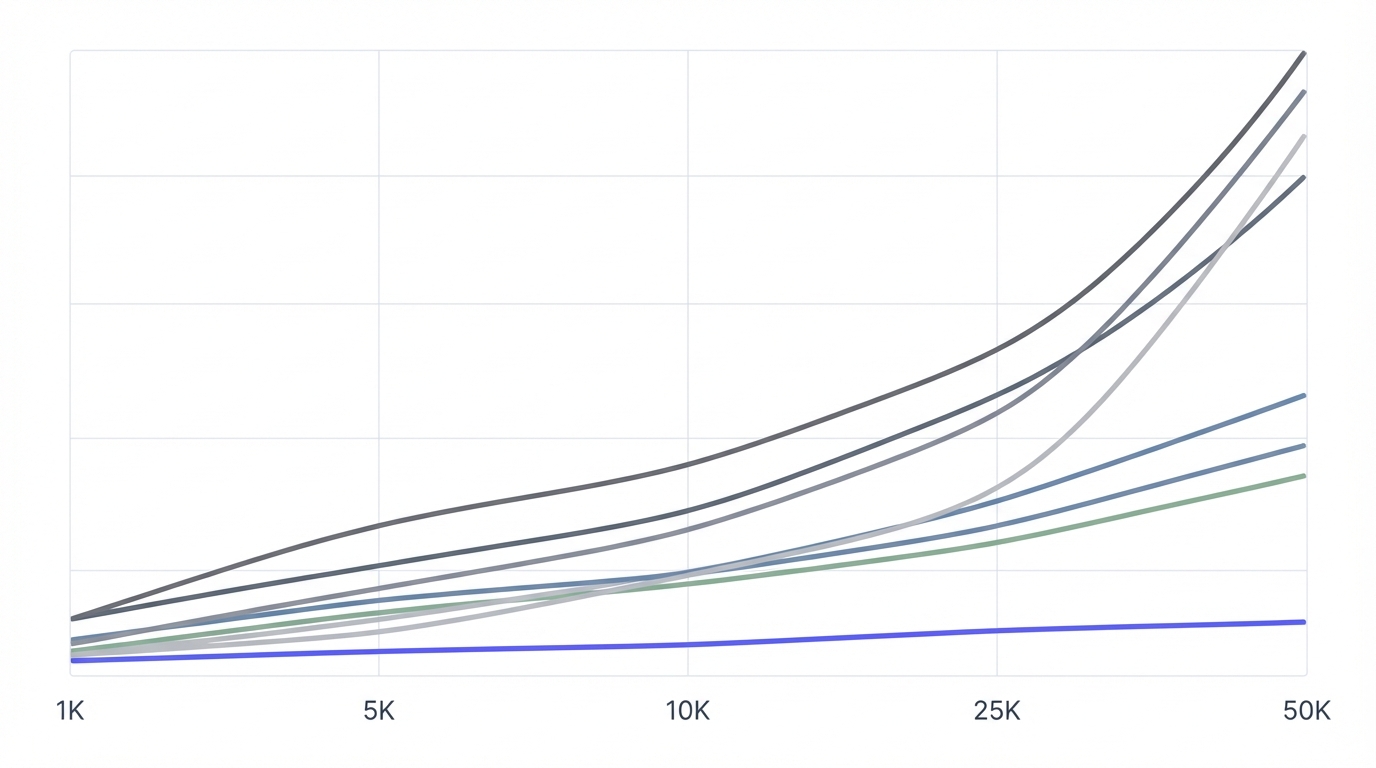
Cost Comparison by User Scale
| User Scale | Build (DIY) | Firebase | AuthHero | Auth0 |
|---|---|---|---|---|
| 0-10K users | $0 base + time | $0-50/month | $0-109/month | $0-400/month |
| 10K-50K users | Infrastructure $100-300 | $0-200/month | $109-629/month | $400-3,000/month |
| 50K-100K users | Infrastructure $300-800 | $200-500/month | $629-1,379/month | $3,000-8,000/month |
| 100K+ users | Infrastructure $800+ | $500-1,500/month | $1,379-3,179/month | $8,000+ (negotiate) |
Note: DIY costs include infrastructure only. Add 5-20 hours/month of engineering time for maintenance, security updates, and feature development.
Break-Even Analysis
When does building your own make financial sense?
Monthly provider cost: $1,500
Engineer time saved: 15 hours/month
Engineer cost: $150/hour

Monthly cost of DIY auth:
  Infrastructure: $300
  Engineer time: 15 hours × $150 = $2,250
  Total: $2,550/month

Provider cost: $1,500/month

Verdict: Provider saves $1,050/month
Build your own only makes sense when:
- Provider cost > $2,000/month
- AND you can maintain it in <10 hours/month
- AND you have spare engineering capacity
- AND opportunity cost of not building features is low
For most indie hackers, this threshold is never reached.
Common Mistakes Indie Hackers Make
Let's talk about what not to do. These are the authentication mistakes that cost you weeks of wasted effort.
Mistake 1: Over-Engineering Auth from Day One
The mistake: You spend 2 weeks building custom auth with email verification, SMS MFA, social login (Google, GitHub, Twitter, Facebook, Apple), magic links, WebAuthn, and a custom admin dashboard for managing users.
Why it's wrong:
- Your MVP isn't even validated yet
- You've built features users didn't ask for
- You've written thousands of lines of security-critical code
- You're now maintaining an auth system instead of building your product
What to do instead:
- Use Firebase, AuthHero, or NextAuth
- Ship in 2 hours, not 2 weeks
- Add features when users request them
- Focus on your actual product
Time wasted: 60-80 hours
Mistake 2: Rolling Your Own (The Hidden Time Cost)
The mistake: "Auth providers are expensive. I'll just build it myself. How hard can password hashing be?"
Why it's wrong:
Building secure auth takes longer than you think. Here's what you're actually signing up for:
Security requirements (40-80 hours):
- Password hashing (bcrypt, scrypt, or Argon2 with proper salts)
- Session management (tokens, expiry, refresh logic)
- Password reset flow (secure tokens, email sending, expiry)
- Email verification (tokens, email sending, retry logic)
- Rate limiting (prevent brute force attacks)
- Security headers (CSRF tokens, XSS protection)
- Input validation (prevent SQL injection, XSS attacks)
- HTTPS enforcement (dev vs. prod environments)
Data management (20-40 hours):
- Database schema for users, sessions, reset tokens
- Privacy compliance (GDPR, CCPA data export/deletion)
- User data migrations as you add fields
Additional features (40-60+ hours each):
- Social login: OAuth 2.0 flows for Google, GitHub, etc.
- SSO: SAML implementation (notoriously complex)
- MFA: TOTP generation, recovery codes, SMS integration
Total time estimate: 100-180 hours for basic auth. Plus ongoing security maintenance forever.
At $150/hour opportunity cost, that's $15,000-27,000.
Most auth providers cost $0-50/month until you have real revenue. Do the math.
When rolling your own makes sense:
- You're at 100K+ users and paying $2K+/month for auth
- You have specific compliance needs (on-premise, air-gapped, etc.)
- You have security engineers on staff who want to own it
For everyone else: Use a provider. Your time is worth more.
Mistake 3: Choosing Based on Features You'll Never Use
The mistake: You compare auth providers on a spreadsheet. Provider A has 47 features. Provider B has 52 features. You choose Provider B because more features = better, right?
Why it's wrong:
- You'll use 5-8 of those features, ever
- The extra features add complexity to the dashboard, docs, and pricing
- You're paying (in money or time) for features that don't matter to your users
- Decision paralysis from comparing 52 features delays shipping
What to do instead:
- List the 3-5 features you need in the next 6 months
- Eliminate providers that don't have those
- Choose the simplest, cheapest option from what's left
- Re-evaluate when your needs change (not before)
The features that actually matter for most indie hackers:
- Email/password auth (basic, everyone has it)
- Social login (Google at minimum)
- Password reset (basic, everyone has it)
- Session management (basic, everyone has it)
- Decent free tier (10K MAU or more)
Features that might matter later:
- SSO (if you go B2B)
- Teams/organizations (if you go B2B)
- Export users (good to have as insurance)
Features you can ignore:
- Advanced threat detection (overkill for most startups)
- Passwordless SMS (email magic links are better and cheaper)
- Blockchain auth (just... no)
Mistake 4: Ignoring Migration Path
The mistake: You choose an auth provider without asking "What if I outgrow this?" Two years later, you're locked in, and switching would require migrating 50,000 users and rewriting half your codebase.
Why it's wrong:
- Auth is deeply integrated (every page, every API call touches it)
- User passwords can't be exported from some providers (users must reset)
- Proprietary SDKs don't port to other providers (full rewrite needed)
- Switching costs are high (engineering time + risk of user churn)
What to do instead:
Ask these questions before choosing any authentication provider:
Export and portability:
- Can I export all user data? (Including password hashes? In what format?)
- Does it use standard protocols? (OAuth 2.0, OIDC, SAML are portable; proprietary APIs aren't)
- Can I migrate users without forcing password resets? (Some providers allow hash import, some don't)
Pricing trajectory:
- What happens if I outgrow the free tier? (Is paid tier affordable? Or a 10x price jump?)
- Are there pricing cliffs? (Does your bill double when you hit certain thresholds?)
Green flags (low lock-in risk):
- Open-source (you can self-host if needed)
- Standard protocols (OAuth, OIDC, SAML)
- Clear export docs (they want you to succeed, not trap you)
- Transparent pricing (no "contact sales" until true enterprise scale)
Red flags (high lock-in risk):
- Can't export password hashes (users must reset = bad UX during migration)
- Proprietary SDKs only (hard to switch without full rewrite)
- Vague "contact sales" pricing (means expensive and opaque)
- No migration tooling or documentation
Cost Optimization for Bootstrapped Founders
You're watching every dollar. Here's how to minimize auth costs without sacrificing security or user experience.
Maximizing Free Tiers (Legitimately)
Free tier limits by provider (2025):
- Firebase: No hard MAU limit, pay-as-you-go (basically free until you're big)
- AuthHero: 10,000 MAU free
- Clerk: 10,000 MAU free
- Auth0: 7,500 MAU free (strict enforcement)
- Stytch: 1,000 MAU free (B2C), unlimited (B2B)
How to stay in free tier longer:
1. Use staging/dev instances sparingly
- Don't count test users toward MAU if you can help it
- Use separate test tenant that doesn't count (most providers offer this)
- Delete test accounts regularly
2. Optimize SMS usage (biggest cost factor)
- SMS costs are often bigger than base MAU costs
- Default to app-based TOTP (Google Authenticator)
- Only offer SMS as optional backup
- Educate users that app-based is faster and more secure (it genuinely is)
3. Encourage social login
- Social login (Google, GitHub) often doesn't count as SMS/email usage
- Slightly better conversion than email/password (fewer form fields)
- Reduces password reset requests (one less support burden)
4. Don't create phantom users
- Some apps create user records before email verification (inflates MAU)
- Only create user record after email verified
- Or use temporary records that don't count as MAU until verified
The Math on When to Pay
Should you pay for a starter tier or stay on free?
Run this calculation:
Current MAU: 8,000
Free tier limit: 7,500
Overage: 500 users

Cost if you upgrade: $29/month
Is it worth it?
Ask: "What does each user generate in revenue or value?"
- If LTV per user is $10+: Paying $29/month for 500 extra users is a no-brainer (500 × $10 = $5,000 potential revenue)
- If you're pre-revenue: Consider if those 500 users would help validate PMF (probably yes)
- If you're stagnant at 8K users (not growing): Stay on free and optimize
Optimization strategies instead of paying:
- Email inactive users, clean up abandoned accounts (reduces MAU count)
- Implement session expiry (90-day sessions mean users must re-auth 4x/year)
- Use "last activity" tracking to identify truly inactive users
When to just pay:
- When you're growing (fighting MAU limits is a waste of time)
- When you have revenue (cost is justified by user value)
- When free tier is limiting features you need
Costs That Sneak Up on You
SMS costs (the big one):
- Can exceed your base auth costs if you're not careful
- 10K users, 40% SMS adoption, 2 logins/month = $320-480/month
- Mitigation: Default to app-based TOTP, make SMS optional
Email sending:
- Password resets, verification emails, magic links
- Usually free up to 10K-50K/month
- After that, ~$0.001-0.01 per email
- At scale: 50K users, 20% reset passwords monthly = 10K emails = $10-100/month
Support costs:
- "I can't log in" tickets scale with users
- Good UX (clear error messages, easy password reset) reduces tickets
- Budget 1-3% of users will contact support about auth issues monthly
Opportunity cost:
- Time spent managing auth instead of building features
- At 10 hours/month maintaining auth × $150/hour = $1,500/month
- If a provider costs $50/month and saves you 10 hours, it's worth $1,450 to you
Real Examples: How Successful Indies Handle Auth
Let's look at how real indie products approached authentication at different stages.
Example 1: Plausible Analytics (Open-Source SaaS)
Stage: $1M+ ARR, bootstrapped Auth choice: Custom-built (Elixir/Phoenix framework)
Why:
- B2B product with simple auth needs (email/password only)
- Wanted full control and privacy (their core value prop is privacy)
- Technical founders comfortable owning auth stack
- No SSO needed (customers are small businesses, not enterprises)
Lesson: If your product's value proposition is privacy/control, custom auth reinforces that message. But they're the exception, not the rule. Most products shouldn't follow this path.
Example 2: EmailOctopus (Email Marketing SaaS)
Stage: $2M+ ARR, bootstrapped Auth choice: Auth0 (initially) → custom auth (later)
Why they switched:
- Auth0 pricing increased significantly as they scaled
- At 50K+ users, custom auth was actually cheaper
- Had engineering resources to maintain it (team of 10+)
- B2B product needed SSO (built it themselves rather than pay enterprise pricing)
Lesson: Switching later is viable if you have revenue and resources. Don't build early when you're cash-constrained. Switch at scale when the economics make sense.
Example 3: Baremetrics (SaaS Analytics)
Stage: Acquired for $4M Auth choice: Standard Rails authentication (Devise gem)
Why:
- Built on Rails (Devise is the standard Ruby gem)
- Simple B2B auth needs (email/password, Google OAuth)
- Didn't need enterprise SSO until later (added via custom SAML implementation)
Lesson: Framework-native auth (Devise for Rails, NextAuth for Next.js, Passport for Node, etc.) works well for simple use cases. Add complexity only when customers demand it and revenue justifies it.
Example 4: Indie Hacker (Anonymous, $50K MRR SaaS)
Stage: Solo founder, B2C SaaS Auth choice: Firebase Auth
Why:
- Launched in a weekend
- Firebase free tier covers them even at 15K users
- No B2B features needed (pure consumer product)
- Time is better spent on core product (founder's solo, shipping fast)
Lesson: Firebase is genuinely great for B2C. If it ain't broke, don't fix it. Don't switch providers just because you "should" scale. Switch when you have a compelling reason.
Common Patterns Across Successful Indies
- Start simple, add complexity later (everyone does this successfully)
- Framework defaults work well (Rails/Devise, Next.js/NextAuth, Laravel/Breeze)
- Switch to custom auth only at scale ($1M+ ARR, 50K+ users, and engineering resources)
- B2C → stick with Firebase/Supabase longer (they're really good, don't fix what isn't broken)
- B2B → need SSO by 100-500 customers (plan for it early or choose provider that includes it)
Our Recommendation: The Indie Hacker's Path
Based on everything above, here's our opinionated recommendation for the typical indie hacker journey.
Start Here (Phase 1: MVP - 0-100 users)
Use Firebase or AuthHero
- Firebase if you're pure B2C and want the fastest possible start
- AuthHero if you might go B2B or want transparent pricing from day one
Spend 2-4 hours on auth, then forget about it for 6 months. Build your core product. Validate your idea. Get users who love what you've built.
Grow to Here (Phase 2-3: Traction to Real Product - 100-10K users)
Stick with your choice until users force a change
Don't switch authentication providers "just because." Switch when you hit a concrete limitation:
Reasons to switch:
- You hit a hard limit (MAU cap, feature gate blocking deals)
- Customer asks for feature you don't have (SSO, SCIM)
- Pricing becomes unjustifiable ($500/month for auth when you're making $2K MRR)
Add features based on user requests, not assumptions:
- Users ask for Google login → add it (30 minutes)
- Users ask for SSO → add it or switch to provider that has it
- Nobody mentions auth → don't touch it, focus on product
Eventually Get to Here (Phase 4: Scale - 10K+ users)
At $50K+ MRR and 10K+ users, re-evaluate your entire auth stack
Ask yourself:
- Is our current auth costing more than $1K/month? (If yes, consider alternatives or negotiate better pricing)
- Do we have engineering resources to own auth? (If yes, custom might make sense at this scale)
- Are we being limited by our provider? (If yes, switch or self-host open-source)
Most indie products stay with a managed provider even at this scale. That's fine. Auth is not your differentiator—let someone else handle it so you can focus on what makes your product unique.
Why We Built AuthHero for Founders Like You
We're indie hackers ourselves. We've felt the auth frustration firsthand:
- Auth0's pricing scared us off before we had any revenue
- Firebase was great until we needed SSO (doesn't support it)
- Clerk looked perfect but got expensive at scale
- Building our own took 3 weeks we didn't have
So we built AuthHero the way we wished authentication worked:
For the MVP stage:
- 10,000 MAU free (enough to validate your idea)
- 5-minute integration (seriously, we timed it with first-time users)
- Beautiful default UI (ship without spending time customizing)
For the growth stage:
- Transparent pricing (you know what 50K users costs: $629/month, no calculator needed)
- SSO included on Pro ($29/month, not $800/month Enterprise tier)
- Teams and orgs built in (when you pivot to B2B)
For the scale stage:
- Export your users anytime (no lock-in, full data portability)
- Volume discounts (the more you grow, the less per user you pay)
- Support that actually responds (we're founders, we get urgent auth issues)
Our philosophy:
- Auth should be invisible infrastructure
- Pricing should be transparent and predictable
- You should be able to leave (we hope you won't, but you can)
Start Building in 5 Minutes—Upgrade When Your Users Tell You To
Here's the truth: authentication is never your product's differentiator (unless you're building an auth company). Your login page won't make or break your startup. Users don't care if you use Auth0 or Firebase or AuthHero—they care if they can log in quickly and get to your actual product.
So use the simplest thing that works. Ship your MVP this weekend. Get users. Learn what they need. Add auth features when they ask for them, not before.
And when you're ready for authentication that grows with you—from side project to real business—we're here.
Ready to get started?
- Sign up for free - 10,000 MAU, no credit card required
- Read the 5-minute quickstart - Integrate in one sitting
- See transparent pricing - No calculator, no sales calls, know exactly what scale costs
Still deciding?
- Compare us to Auth0 - See the pricing and feature differences
- Compare us to Clerk - Side-by-side comparison
- Compare us to Firebase - When to use each
Now go build something awesome. We'll handle the auth.