The Complete Guide to Authentication Pricing in 2025: What Every Startup Should Know
Authentication pricing is intentionally confusing. We break down every auth provider's real costs, hidden fees, and MAU traps—so you can choose wisely and budget accurately.

If you've ever tried to calculate what authentication will actually cost your startup, you know the frustration. Every pricing page seems designed to confuse rather than clarify. Auth0 forces you through a calculator that still ends with "Contact Sales." Clerk's add-ons multiply faster than you'd expect. WorkOS bases pricing on "connections" in ways that make early-stage math impossible.
And then there was Auth0's infamous 300% price increase in 2023, which left thousands of startups scrambling to migrate or accept devastating cost increases.
This isn't by accident. Authentication providers have learned that opacity equals margin. The more confusing the pricing, the harder it is to compare, and the easier it is to extract premium pricing through strategic feature gates and surprise overages.
This guide cuts through the confusion. We'll break down every major authentication pricing model, expose the hidden costs nobody talks about, and give you the actual numbers you need to budget accurately. Whether you're choosing your first auth provider or planning a migration, you'll finish this guide knowing exactly what to expect—and what questions to ask before signing up.
Understanding Auth Pricing Models
Before we dive into specific providers, let's break down the fundamental pricing models you'll encounter in 2025. Most auth providers use one or a combination of these approaches, and understanding how each model works is crucial to avoiding surprise bills later.
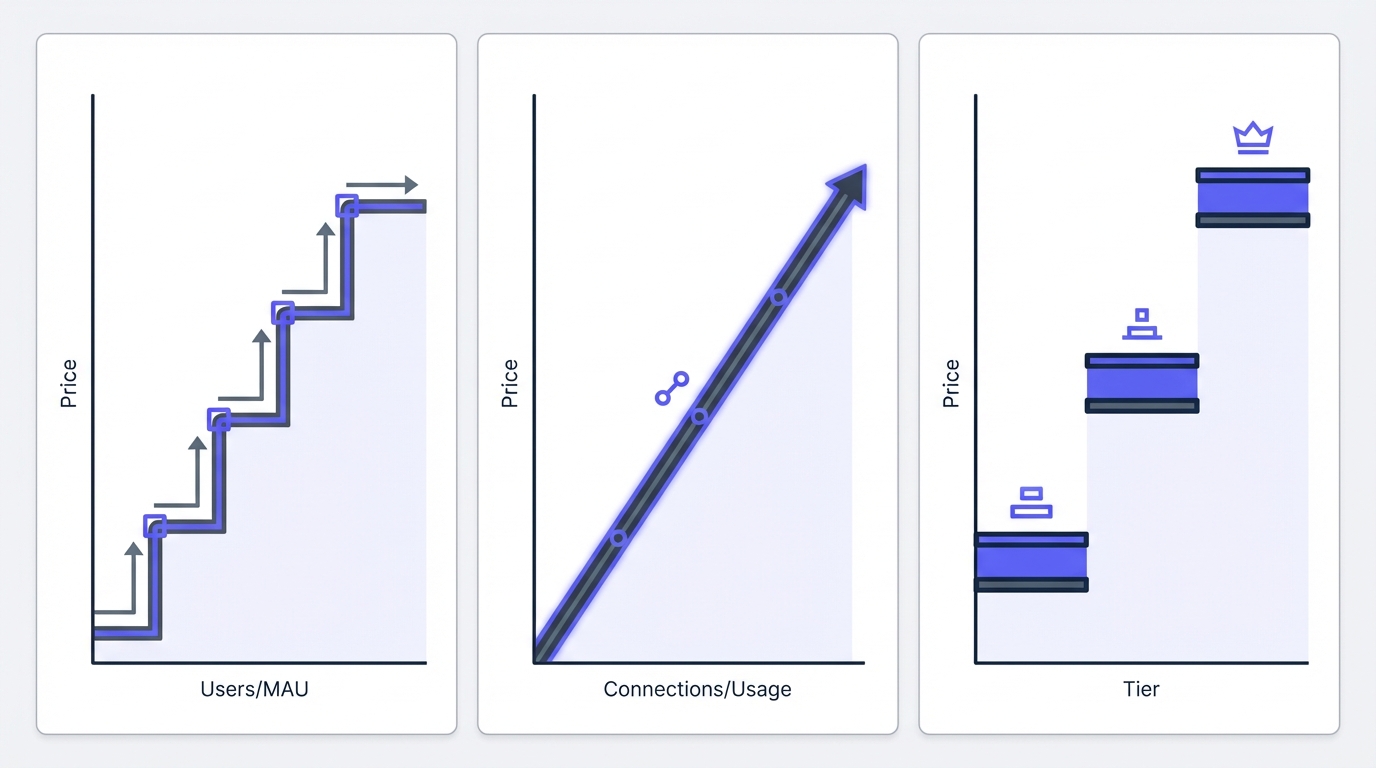
MAU-Based Pricing (Most Common)
Monthly Active Users (MAU) is the dominant pricing model in authentication. You pay based on how many unique users log in during a calendar month. Sounds simple, but the devil is in the details.
How it works:
- User logs in January 1st: counts as 1 MAU
- Same user logs in 47 times that month: still counts as 1 MAU
- User doesn't log in February: doesn't count toward February MAU
- User returns in March: counts as 1 MAU again
The trap: Most providers structure MAU pricing in tiers with sharp cliffs. Going from 9,999 to 10,001 users might double your bill. These pricing cliffs can devastate your unit economics if you're not prepared.
Who uses this model: Auth0, Clerk, Stytch, Kinde, AuthHero
💡 Key Insight: MAU pricing rewards products with irregular usage patterns. If your users log in infrequently (weekly or monthly), MAU can be much cheaper than per-user pricing. However, be vigilant about tier cliffs.
Per-Connection/Seat Pricing
WorkOS pioneered this model, charging per "connection" rather than users. A connection is typically an SSO integration (like "Acme Corp's Okta" or "BigCo's Azure AD").
How it works:
- You integrate WorkOS
- Customer A wants Google SSO: 1 connection
- Customer B wants Okta SSO: 1 connection
- 1,000 users from Customer A: still just 1 connection
The advantage: Highly predictable for B2B SaaS where you have few customers but many users per customer.
The disadvantage: Confusing for early-stage products with many small customers. 100 customers = 100 connections, even if total users is low.
Who uses this model: WorkOS (primary model)
Flat-Rate Tiers
Some providers offer simple monthly tiers regardless of usage, often with reasonable caps.
How it works:
- Starter: $29/month for up to 10K MAU
- Pro: $99/month for up to 50K MAU
- Business: $299/month for up to 200K MAU
The advantage: Predictable billing, easy budgeting, no surprise overages.
The disadvantage: Less flexible if your usage is spiky or seasonal. You pay the full tier rate even in slow months.
Who uses this model: Older auth providers, some open-source commercial offerings
Usage-Based Add-Ons
Even if the base pricing is MAU or tier-based, most authentication providers charge separately for:
- SMS/OTP messages: $0.01 to $0.06 per message
- Email sends: Usually free in moderate volumes, then $0.001-0.01 per email
- API calls: Rate limits on lower tiers, then per-million pricing
- Storage: User metadata, custom attributes (rarely a significant cost)
The trap: SMS costs sneak up on you. If 30% of your users prefer SMS MFA, and they log in 4x/month, that's 1.2 SMS per user per month. At $0.04 per SMS, that's $0.048/user/month just for MFA—potentially more than your base auth cost.
⚠️ Warning: SMS authentication costs have destroyed many startups' unit economics. Always model SMS usage carefully and encourage app-based TOTP (like Google Authenticator) as your default MFA method.
Self-Hosted vs. Managed
Open-source authentication options like Keycloak, Ory, or Authentik can be self-hosted "for free," but you pay in infrastructure and engineering time.
Actual costs:
- Server infrastructure: $50-500/month depending on scale
- Engineering setup: 40-120 hours initially
- Ongoing maintenance: 5-20 hours/month
- Security updates and monitoring: Priceless (when you need it)
Most startups find that managed auth is cheaper until you're at meaningful scale (100K+ users) or have specific compliance needs that justify the complexity.
The Real Cost Breakdown by Growth Stage
Let's talk about what you'll actually pay in 2025. Every auth provider structures their authentication pricing differently, but the cost components are similar. Here's what to budget for at each stage.
Base Platform Fees
This is the starting price to access the platform at all.
Free tiers:
- Auth0: 7,500 MAU free
- Clerk: 10,000 MAU free
- Stytch: 1,000 MAU free (B2C), unlimited (B2B)
- Kinde: 10,500 MAU free
- Firebase: No hard MAU limit, pay-as-you-go
- AuthHero: 10,000 MAU free
First paid tier:
- Auth0: $35/month (essentials, B2C), $240/month (B2B)
- Clerk: $25/month (Pro)
- Stytch: $249/month (B2C Pro), $99/month (B2B Growth)
- Kinde: $25/month (Pro)
- WorkOS: $125/month base
- AuthHero: $29/month (Pro)
MAU Overages: The Cliff Problem
This is where authentication pricing gets expensive and unpredictable. Understanding pricing cliffs is critical to avoiding bill shock.
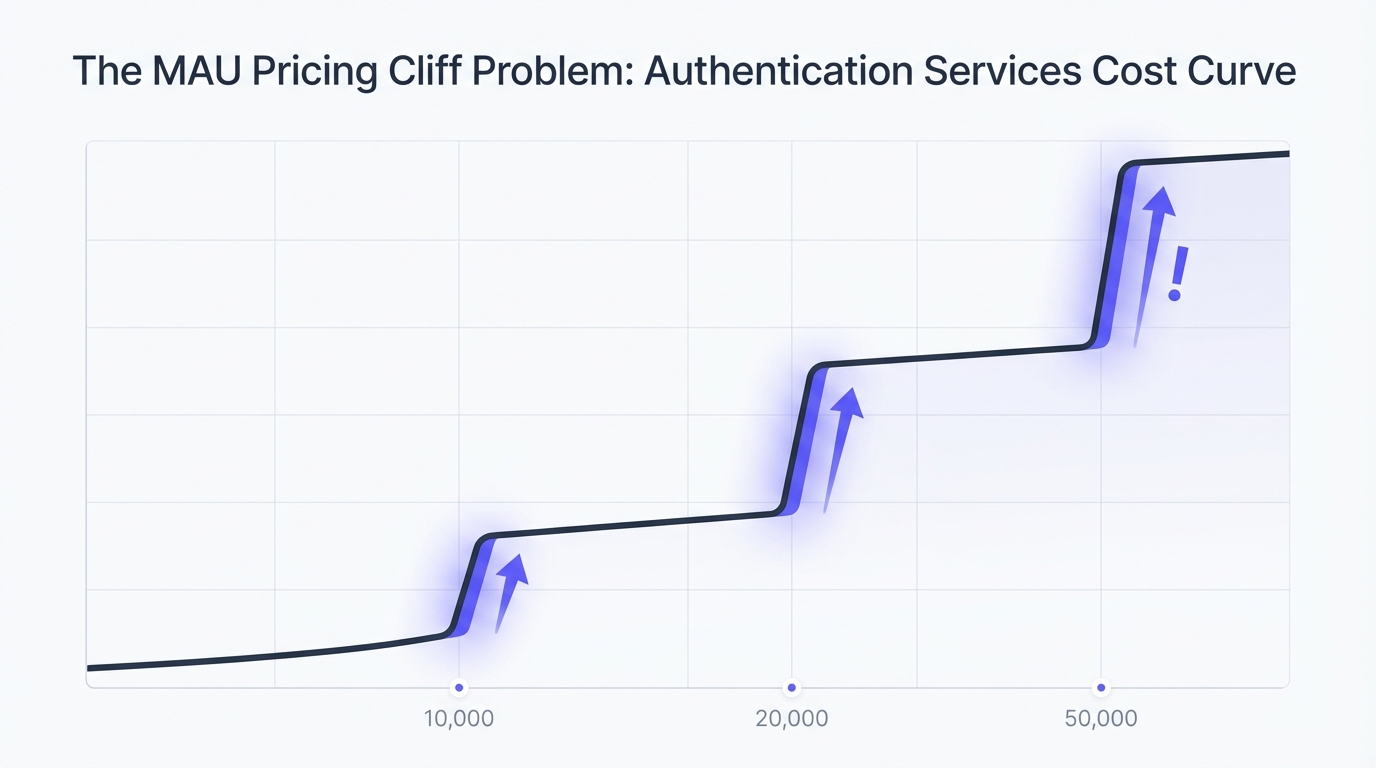
Most providers structure MAU in blocks. Once you exceed a block, you jump to the next pricing tier or pay overage fees. Let's look at Auth0 as the cautionary tale.
Auth0 B2C Essentials (as of 2025):
- Base: $35/month for up to 500 additional MAU (beyond 7,500 free)
- 501-1,000 MAU: $70/month
- 1,001-2,500 MAU: $140/month
- 2,501-5,000 MAU: $280/month
- 5,001-10,000 MAU: $560/month
- 10,001+ MAU: Contact sales (but historically ~$1,120/month for 20K, $2,800/month for 50K)
Notice the pattern? Each tier approximately doubles. This creates pricing cliffs where going from 9,999 to 10,001 MAU can double your monthly bill overnight.
Clerk MAU pricing (more transparent):
- Pro: $25/month base + $0.02/MAU over 10K
- 20K MAU = $25 + (10K × $0.02) = $225/month
- 50K MAU = $25 + (40K × $0.02) = $825/month
- 100K MAU = $25 + (90K × $0.02) = $1,825/month
Clerk's model is more predictable but can add up quickly at scale. The key advantage: no cliffs, linear scaling that's easier to forecast.
AuthHero pricing:
- Pro: $29/month base + $0.015/MAU over 10K
- 20K MAU = $29 + (10K × $0.015) = $179/month
- 50K MAU = $29 + (40K × $0.015) = $629/month
- 100K MAU = $29 + (90K × $0.015) = $1,379/month
Enterprise Feature Add-Ons
This is where authentication providers make their real money. Features that most startups don't need until Series A or later—but when you need them, you need them desperately.
SAML SSO (Single Sign-On):
- Auth0: Enterprise plan only ($$$$ contact sales)
- Clerk: Enterprise plan ($800/month minimum reported)
- Stytch: B2B Pro plan ($249/month) or Enterprise
- WorkOS: Included in base pricing (their competitive advantage)
- AuthHero: Pro plan ($29/month, included)
SCIM (User Provisioning):
- Auth0: Enterprise plan
- Clerk: Enterprise plan
- Stytch: Enterprise plan
- WorkOS: Enterprise plan
- Most providers: $5K-15K/year minimum when it's an add-on
Advanced MFA (beyond SMS/TOTP):
- WebAuthn/Passkeys: Often included now (table stakes in 2025)
- Hardware tokens (YubiKey): Enterprise feature at most providers
- Biometric MFA: Increasingly included
Custom Domains (auth.yourdomain.com):
- Auth0: Professional plan or higher (~$240/month B2B)
- Clerk: Pro plan ($25/month)
- Stytch: Pro plan or higher
- AuthHero: Pro plan ($29/month)
SMS/OTP Costs: The Hidden Budget Killer
SMS is the hidden cost that catches startups by surprise. Providers charge per message, and users who prefer SMS MFA can send your costs soaring.
Per-message costs (2025 rates):
- Auth0: $0.05-0.065 per SMS (region-dependent)
- Clerk: $0.01-0.06 per SMS (varies by provider)
- Stytch: $0.04-0.06 per SMS
- Twilio (if you integrate directly): $0.0079-0.04 per SMS
- AuthHero: $0.02-0.045 per SMS (pass-through pricing)
Real-world scenario:
- 10,000 MAU
- 40% opt for SMS MFA (4,000 users)
- Average 3 logins/month (12,000 SMS)
- At $0.04/SMS: $480/month in SMS costs
- Your base MAU cost: ~$200/month
- Total: $680/month (SMS is 71% of total cost!)
Mitigation strategies:
- Encourage app-based TOTP (Google Authenticator, Authy) over SMS
- Make SMS optional, not default
- Set SMS rate limits per user (e.g., max 5 codes per day)
- Consider email-based magic links as alternative
- Educate users that app-based MFA is more secure (it genuinely is)
Support Tier Upgrades
Most free and starter tiers include "community support" (forums) or email support with 48-hour SLA. As you scale, you'll want faster response times.
Support pricing:
- Auth0: Standard support included; Priority support (4-hour SLA) requires Professional or Enterprise
- Clerk: Email support on Pro; Slack/priority support on Enterprise
- Stytch: Email support on Growth/Pro; Dedicated slack on Enterprise
- AuthHero: Email support on all paid plans; Priority support available
What you're really paying for: Peace of mind when auth breaks. For revenue-generating applications, a 4-hour auth outage can cost tens of thousands in lost revenue. Support upgrades are often worth it once you're post-product-market-fit.
Compliance Certifications
If you sell to enterprises or operate in regulated industries, you'll need compliance certifications. Understanding which tier includes these is critical.
Common requirements:
- SOC 2 Type II
- HIPAA compliance
- GDPR compliance (table stakes, not usually an upcharge)
- PCI DSS (for payment data)
How providers handle this:
- Most established providers (Auth0, Clerk, Stytch, WorkOS) include SOC 2 and GDPR compliance even on lower tiers
- HIPAA and PCI usually require Enterprise plans
- Proof of compliance (reports, BAAs) may require Enterprise tier even if the underlying tech is compliant
Authentication Pricing Comparison: Real Numbers
Let's put real numbers to common scenarios. Here's what you'd actually pay at different growth stages in 2025.
Scenario 1: Early Stage (10,000 MAU, basic features)
Assumptions: Email/password + Google OAuth, no SSO, moderate SMS usage (20% of users, 2x/month = 4,000 SMS), email magic links available.
| Provider | Base Cost | MAU Cost | SMS Cost | Total/Month | Notes |
|---|---|---|---|---|---|
| Auth0 (Essentials) | $35 | $105 (2,500 MAU block) | $260 (4K × $0.065) | $400 | Tier-based pricing creates cliffs |
| Clerk (Pro) | $25 | $0 (within free 10K) | $160 (4K × $0.04) | $185 | Linear overage pricing |
| Stytch (B2C Pro) | $249 | Included (25K) | $240 (4K × $0.06) | $489 | Higher base, includes more MAU |
| Kinde (Pro) | $25 | $0 (within free 10.5K) | Varies | ~$200 | Competitive free tier |
| Firebase | $0 | $0 | $32 (4K × $0.008 via GCP) | $32 | Cheapest but limited features |
| AuthHero | $29 | $0 (within free 10K) | $80 (4K × $0.02) | $109 | Best value for managed service |
Winner at this stage: Firebase (cheapest) or AuthHero (best value for full-featured managed service)
Scenario 2: Growth Stage (50,000 MAU, adding SAML SSO)
Assumptions: Email/password + social logins, SAML SSO for 2 enterprise customers, moderate MFA (30% SMS, 2x/month = 30,000 SMS).
| Provider | Base + SSO | MAU Cost | SMS Cost | Total/Month | Notes |
|---|---|---|---|---|---|
| Auth0 (Professional B2B) | $240 | $1,120 (est. 50K block) | $1,950 (30K × $0.065) | $3,310 | SSO requires Enterprise for B2C |
| Clerk (Enterprise) | $800 | $800 (40K × $0.02) | $1,200 (30K × $0.04) | $2,800 | High base for SSO |
| Stytch (B2C Pro) | $249 | $250 (25K overage × $0.01) | $1,800 (30K × $0.06) | $2,299 | Competitive at this scale |
| WorkOS (Business) | $125 | N/A (2 connections) | Varies (Twilio integration) | ~$1,500 | Best for B2B-only |
| AuthHero | $29 | $600 (40K × $0.015) | $675 (30K × $0.0225 avg) | $1,304 | SSO on Pro tier |
Note: Auth0 requires Enterprise for SAML in B2C, which starts at ~$10K+/year minimum. We've estimated B2B Professional pricing here.
Winner at this stage: AuthHero (best value with SSO) or WorkOS (if B2B-only use case)
Scenario 3: Scale Stage (100,000 MAU, enterprise features)
Assumptions: All auth methods, SAML SSO, SCIM, advanced MFA, custom domain, 40% SMS adoption (2x/month = 80,000 SMS).
| Provider | Base + Features | MAU Cost | SMS Cost | Total/Month | Notes |
|---|---|---|---|---|---|
| Auth0 (Enterprise) | Contact sales | ~$2,800 (est.) | $5,200 (80K × $0.065) | $8,000+ | Custom contract required |
| Clerk (Enterprise) | $800 | $1,800 (90K × $0.02) | $3,200 (80K × $0.04) | $5,800 | All enterprise features |
| Stytch (Enterprise) | Custom | ~$1,000 (est.) | $4,800 (80K × $0.06) | $5,800+ | Negotiated pricing |
| WorkOS (Enterprise) | Custom | ~$500 (est., 5-10 conn) | $2,400 (via Twilio at $0.03) | $3,000+ | Connection-based model |
| AuthHero | $29 | $1,350 (90K × $0.015) | $1,800 (80K × $0.0225) | $3,179 | Transparent pricing maintained |
Note: At this scale, most providers move to custom enterprise contracts with negotiated rates. Numbers here are estimates based on publicly available data and user reports.
Winner at this stage: Negotiate with everyone, but AuthHero provides transparent baseline pricing to benchmark against.
Cost Comparison Summary Table
| Growth Stage | User Count | Cheapest Option | Best Value | Enterprise Choice |
|---|---|---|---|---|
| MVP | 0-10K | Firebase ($0-50) | AuthHero ($29-150) | N/A |
| Early Growth | 10K-50K | AuthHero ($150-650) | Clerk ($185-825) | WorkOS (B2B) |
| Scale | 50K-100K | AuthHero ($650-1,400) | Stytch ($2,000+) | Auth0 (negotiate) |
| Enterprise | 100K+ | Custom (negotiate all) | AuthHero ($3,200+) | Auth0/WorkOS |
Hidden Costs Nobody Talks About
The pricing tables above show direct costs. But there are indirect costs that can dwarf your monthly auth bill. Understanding these is crucial to true total cost of ownership.

Integration and Migration Engineering Time
Initial integration:
- Simple integration (pre-built SDK): 8-20 hours
- Custom integration (API-only): 40-80 hours
- Complex migration (from homegrown auth): 120-200 hours
At $150/hour fully-loaded cost for a senior engineer:
- Simple: $1,200-3,000
- Custom: $6,000-12,000
- Complex: $18,000-30,000
Migration costs (switching providers):
- User data export/import: 20-40 hours
- Testing all auth flows: 16-24 hours
- Deployment and rollback planning: 8-16 hours
- User communication and support: 8-16 hours
Total migration cost: $8,000-15,000 in engineering time, not counting the risk of user churn or login issues during the switch.
Lesson: Choose carefully upfront. Switching auth providers later is expensive and risky. This is infrastructure you'll live with for years.
Vendor Lock-In and Switching Costs
Auth providers know that switching costs are high, which is why they can get away with price increases like Auth0's 300% jump in 2023.
Lock-in factors:
- Proprietary SDKs and APIs (not just standard OAuth/OIDC)
- Custom user metadata stored in provider's format
- Embedded UI components that don't port to other providers
- Webhooks and integrations built against specific APIs
The Auth0 exodus of 2023: When Auth0 announced pricing changes, thousands of startups faced a choice: accept 2-4x higher costs or spend engineering months migrating. Most chose to pay, which is exactly what Auth0 counted on.
How to reduce lock-in:
- Use standards (OAuth 2.0, OIDC) where possible
- Keep user metadata minimal or mirror it in your own database
- Abstract your auth integration behind an internal interface
- Export user data regularly as backup
💡 Key Insight: Build an abstraction layer around your auth provider from day one. A simple wrapper around auth calls makes switching providers 10x easier and gives you negotiating leverage.
Feature Gates That Force Tier Upgrades
Providers strategically place features to force upgrades at key growth points. This is by design, not accident.
Common feature gates:
- Custom domains: Often gated to paid tiers. Matters when you're branding-conscious or need auth.yourdomain.com for user trust.
- SAML SSO: Locked behind Enterprise at most providers. Matters when your first enterprise customer asks for it (and they will).
- Remove branding: "Powered by AuthProvider" on login screens. Gated to Professional/Enterprise tiers.
- Higher rate limits: Free tiers may have API rate limits that become constraining as you scale.
The trap: You build on a free or starter tier, hit product-market fit, then discover the feature you need requires a 10x price jump to Enterprise.
Mitigation: Review pricing pages for every tier, not just the one you're on. Ask yourself: "What will we need in 12 months?" and verify those features are available at a price you can afford.
"Unlimited" That Isn't
Many providers advertise "unlimited" users, API calls, or features—but the fine print tells a different story.
Rate limits:
- "Unlimited API calls" often means "fair use policy" enforced at ~1,000 requests/second
- Exceed the limit and you're throttled or forced to upgrade
Fair use policies:
- Vague terms like "reasonable use" that give providers unilateral power to cut you off or force upgrades
- What's "reasonable" at 10K users is "abuse" at 100K users
Storage limits:
- "Unlimited users" but capped user metadata (e.g., 10KB per user)
- Want to store more? Pay for database add-ons
Always read the SLA and fair use policy before assuming "unlimited" means unlimited. These policies give providers an escape hatch to charge you more later.
Hidden Cost Checklist
Use this checklist to uncover the true cost of any authentication provider:
- [ ] Base platform fee (monthly subscription)
- [ ] MAU overages (calculate at 2x, 5x, 10x current usage)
- [ ] SMS costs (model realistic MFA adoption rates)
- [ ] Email sending (password resets, magic links, verification)
- [ ] Feature unlock costs (SSO, custom domain, advanced MFA)
- [ ] Support tier upgrade (when you need faster response times)
- [ ] Compliance reports (SOC 2 copies, BAAs, attestation letters)
- [ ] Integration engineering time (initial setup)
- [ ] Migration engineering time (if switching later)
- [ ] Opportunity cost (time spent on auth vs. core product)
When to Upgrade: A Practical Framework
Not all pricing tiers are created equal, and upgrading too early wastes money while upgrading too late creates technical debt and lost opportunities. Here's how to think about authentication pricing tiers strategically.
Signs You've Outgrown Free Tier
Hard limits (upgrade immediately):
- You're hitting MAU caps monthly and turning away users
- Rate limits are causing errors in production
- Required features (like SSO) aren't available and blocking deals
Soft limits (plan upgrade within 1-3 months):
- Support response time is too slow for business-critical auth
- "Powered by Provider" branding hurts conversion or trust
- Custom domain needed for user trust or compliance
- You're working around limitations with hacky solutions
When free tier makes sense:
- Pre-product-market-fit (under 5K MAU)
- Side projects or internal tools
- Testing/staging environments
When to upgrade: Once you're charging customers or your auth is revenue-critical, upgrade to a paid tier with SLA and support. The cost is negligible compared to the risk of downtime.
Features Worth Paying For vs. Nice-to-Haves
Worth paying for (when you need them):
- SAML SSO (when enterprise customer demands it—can unlock $50K+ deals)
- Guaranteed uptime SLA (when downtime = lost revenue)
- Priority support (when auth issues block revenue)
- Custom domains (for brand consistency and trust)
- Advanced security features (anomaly detection, adaptive MFA) if you're in regulated space
Nice-to-haves that can wait:
- Branded login screens (you can use default until you're post-PMF)
- Advanced analytics (build your own basic tracking first)
- Unlimited customization (standard flows work for 90% of use cases)
- White-glove onboarding (read the docs, save $5K)
The "Series A Math" on Auth Spend
Once you've raised a Series A, your relationship with auth spending changes. You're optimizing for growth velocity, not cash conservation.
Typical Series A budget allocation:
- Infrastructure (hosting, auth, observability): 5-10% of engineering budget
- At $2M/year engineering budget: $100K-200K for infrastructure
- Auth at 20-30% of infrastructure: $20K-60K/year (~$1,700-5,000/month)
At that spend level:
- You can afford enterprise features if they unlock revenue
- Pay for premium support to reduce engineering drag
- Focus on growth features, not auth cost optimization
- Buy vs. build calculus shifts toward buying
Pre-Series A:
- Optimize for cash efficiency
- Use free tiers as long as viable
- Self-serve tools over enterprise contracts
- DIY integrations over white-glove onboarding
Authentication Pricing Calculator (DIY)
Use this framework to calculate your true authentication cost at your target scale:
Step 1: Calculate Base Costs
Monthly Active Users (MAU): _________
Provider base fee: $_________
MAU overage charge: $_________ per MAU
Total MAU cost: $_________
Step 2: Calculate Usage Costs
SMS MFA adoption rate: _____%
Average logins per user per month: _____
SMS messages per month: MAU × adoption rate × logins = _____
SMS cost per message: $_____
Total SMS cost: $_________

Email verification rate: _____%
Password resets per month: _____
Total email cost: $_________
Step 3: Calculate Feature Costs
Need SAML SSO? Yes/No
If yes, cost: $_________

Need SCIM? Yes/No
If yes, cost: $_________

Need custom domain? Yes/No
If yes, cost: $_________

Need priority support? Yes/No
If yes, cost: $_________
Step 4: Total Monthly Cost
Base + MAU: $_________
SMS/Email: $_________
Features: $_________
Support: $_________
─────────────────
TOTAL: $_________
Per-user cost: $_________ (Total ÷ MAU)
Step 5: Calculate 12-Month Cost with Growth
Current MAU: _____
Projected 12-month MAU: _____
Growth factor: _____

Cost today: $_________
Cost at 12 months: $_________
Total year 1 cost (average): $_________
Our Approach to Transparent Authentication Pricing
We built AuthHero because we experienced the auth pricing frustration firsthand. As founders, we wanted transparency and predictability—so that's what we offer.
Why We Publish Everything Publicly
Every price, every feature gate, every limit is on our pricing page. No calculators that hide the math. No "contact sales" until you're truly at enterprise scale (500K+ MAU or custom contracts).
Our philosophy:
- If we're proud of our pricing, we should show it
- Hidden pricing is a signal of hidden value extraction
- Founders deserve to budget accurately and plan ahead
No "Contact Sales" Until True Enterprise Scale
You can sign up, integrate, scale to 100K+ MAU, add SSO and MFA, all on transparent self-serve pricing. No sales calls, no negotiations, no annual contracts.
When we ask you to talk to sales:
- 500K+ MAU (volume discounts available)
- Custom compliance needs (SOC 2 Type II reports, BAAs, custom DPAs)
- Multi-tenant isolation requirements
- SLA customization (99.99% uptime guarantees, custom terms)
For everyone else: Published pricing, instant activation, pay with credit card, cancel anytime.
How We Keep Costs Predictable
Linear MAU pricing: No cliffs. Every additional user costs the same incremental rate ($0.015/MAU over 10K on Pro). Model your growth with confidence.
SMS pass-through pricing: We don't mark up SMS. You pay what we pay (~$0.02-0.045 depending on region), and we show you the breakdown.
Features on lower tiers: SAML SSO, custom domains, and team features are available on the Pro plan ($29/month), not locked behind Enterprise pricing.
Public roadmap: We tell you what's coming, so you can plan. No surprise feature gates that force expensive upgrades.
Questions to Ask Any Auth Provider
Before you sign up with any auth provider—including us—ask these questions to avoid costly surprises down the road.
Pricing Questions
- What's the total cost at 10K, 50K, and 100K MAU? Make them show the math, including base fees, MAU overages, and typical SMS costs.
- Are there pricing cliffs? What happens when you go from 9,999 to 10,001 users? Does your bill double?
- What's included in the base price vs. add-ons? Is SSO extra? Custom domains? MFA options? Team features?
- How much do SMS/OTP messages cost? What's the markup over provider cost? Can I use my own Twilio account?
- What triggers a forced upgrade? Will you hit feature gates or rate limits as you grow?
- What happens if I exceed limits? Are you throttled, forced to upgrade, or charged overages?
- Is there a committed contract? Can I downgrade or cancel anytime? Are there early termination fees?
Migration and Lock-In Questions
- Can I export all user data anytime? In what format? Can I export password hashes or will users need to reset?
- Do you use standard protocols (OAuth 2.0, OIDC, SAML)? Or proprietary APIs that create lock-in?
- What's your migration support? Do you offer tooling to import from other providers?
- What's your uptime SLA? What recourse if you miss it? (Credits? Refunds? Actual compensation?)
Growth Questions
- What features will I need in 12-24 months? Are they available on my tier or will I be forced to upgrade?
- When do your customers typically upgrade tiers? What triggers the move? (This reveals hidden limitations)
- How do you handle pricing changes? Grandfathered rates or forced increases? What happened in 2023 with your pricing?
Support and Reliability
- What support is included? Email? Slack? Phone? What's the actual SLA response time?
- Where is user data stored? Can I choose regions (for GDPR, data residency requirements)?
- What's your approach to security updates? How quickly are vulnerabilities patched? What's your track record?
Final Thoughts on Authentication Pricing in 2025
Authentication pricing in 2025 shouldn't require a finance degree to understand. Yet most providers have made it deliberately complex to maximize extraction and minimize comparison.
Our advice:
- Start with transparency. If a provider won't show you clear pricing, they don't respect your time or your budget.
- Model your growth. Calculate costs at 2x, 5x, and 10x your current scale. Avoid providers with sharp pricing cliffs.
- Read the fine print. Fair use policies, rate limits, and feature gates are where the gotchas hide.
- Plan for migration. Every provider relationship eventually ends. Make sure you can leave without catastrophic costs.
- Factor in hidden costs. SMS charges, support upgrades, and engineering time often exceed base fees.
At AuthHero, we believe auth should be simple, transparent, and priced fairly. See our pricing—no calculator needed, no sales call required, no surprises at scale.
Ready to see the difference transparent pricing makes?
- View our pricing page - See exact costs at every scale
- Start building in 5 minutes - 10,000 MAU free, no credit card required
- Compare us to Auth0 - See the cost difference side-by-side
- Compare us to Clerk - Transparent comparison tables
Last updated: January 2025. Pricing data collected from public sources and verified where possible. Enterprise pricing estimated from user reports.